


Account opening loses momentum each time a user must hunt for an ID. The right verification flow screens risk without turning signup into a paperwork exercise.
Book a VerifEye demo to see how a document-free human verification layer can support faster account opening.
A kyc verification api connects identity checks to account opening so teams can verify users without sending every signup to manual review. For lower-stakes, high-volume flows, Realeyes VerifEye can confirm human presence, liveness, uniqueness, age signals, and bot risk without government ID uploads or retained images.
That raises a practical question for product and engineering teams: where does an API fit in signup, and which checks belong there? The next section, What Is a KYC Verification API?, defines that role before we look at implementation choices. The path begins with:
What Is a KYC Verification API?
A bridge between onboarding and identity checks
A KYC verification API is a software connection that adds identity checks to an account opening flow. Instead of sending each applicant through a separate process, a product can request checks as part of onboarding. The API sends the required data to verification services and returns results for the next step.
The exact checks depend on the business, risk level, and rules that apply. A workflow may compare identity data with approved sources, review an ID document, or ask for a liveness check. These checks can help reduce fraud and identity theft risk. That risk remains a focus of the Federal Trade Commission.
One layer in a wider compliance workflow
A KYC verification API does not make a compliance decision on its own. It gives the product team a clear way to call services, collect results, and route exceptions. A business can use those results to approve an account, ask for more evidence, or send a case for manual review.
For enterprise teams, the API also shapes the product experience. It can place checks at signup, before a payment, or when an account action adds risk. This approach helps teams connect digital identity verification with the moments that matter. Teams can avoid adding the same burden to every user.
- Account opening: Start checks inside the signup flow.
- Identity review: Return a result or route the case for added proof.
- Human verification: Check whether a real person is present when the flow calls for it.
- Compliance handling: Keep product logic for approvals, exceptions, and manual review.
- User experience: Match added friction to the risk of the action.
Where lower-friction human verification fits
Not every interaction needs a government ID upload. Realeyes VerifEye adds a lower-friction human verification layer for use cases where teams need proof of human presence. Its capabilities include liveness, uniqueness, bot detection, and continuous verification. The flow does not require a government ID, and it uses zero image storage.
That makes VerifEye useful alongside a regulated KYC stack, not as a blanket replacement for document checks. A team may use it to reduce bot activity, add a human check, or protect repeat account actions. For higher-risk cases, the workflow can still route users to the required checks. The VerifEye product page explains the low-friction verification layer in more detail.
Why Low-Friction Account Opening Matters
The cost of an extra step
Account opening is a balancing act. Each extra check may help manage risk, but it can also interrupt a valid user’s path. A document-heavy flow asks people to find an ID, capture it clearly, and wait for a result. That added work can create drop-off before an account is active.
The right flow starts with the risk of the action. A bank transfer may justify deeper checks than joining a survey panel or creating a gaming profile. Teams choosing a user verification service should map each check to a clear risk. They should not add the same burden everywhere.
Fraud controls without document collection
Lightweight human verification fills a narrower role than full KYC. It can confirm that a real person is present without asking for a government ID. This approach can help screen bots, repeat accounts, and scripted abuse at account opening. It can also support step-up checks when behavior changes later.
A kyc verification api should not turn every account into a document review. For lower-stakes use cases, VerifEye checks human presence, liveness, uniqueness, and demographic attributes without government ID documents. The service uses consent-based verification and zero image storage. Teams can learn more about its privacy-first verification flow.
Privacy and compliance by design
Low friction does not mean skipping controls. It means collecting only what the moment calls for. Document collection creates more sensitive data to handle, protect, and govern. A lighter check can reduce that burden when a full identity record is not needed.
The boundary matters. Human verification can be a first-line control for lower-risk moments. Regulated or high-risk actions may still need full KYC checks. A layered flow can apply stronger checks when the product, transaction, or user behavior calls for them.
Compliance teams still need to define each tier before launch. They should document the trigger, the data collected, and the next action. Product teams can then place step-up checks where the risk changes. This keeps the user path clear without treating every event as equal.
That model also supports clearer consent. Users should know what the check does and what data the system keeps. VerifEye does not store images or write them to disk; it retains only essential metadata. For teams planning account verification, this creates a path between no screening and document-heavy onboarding.
How KYC API Workflows Fit Together
From consent to a verification session
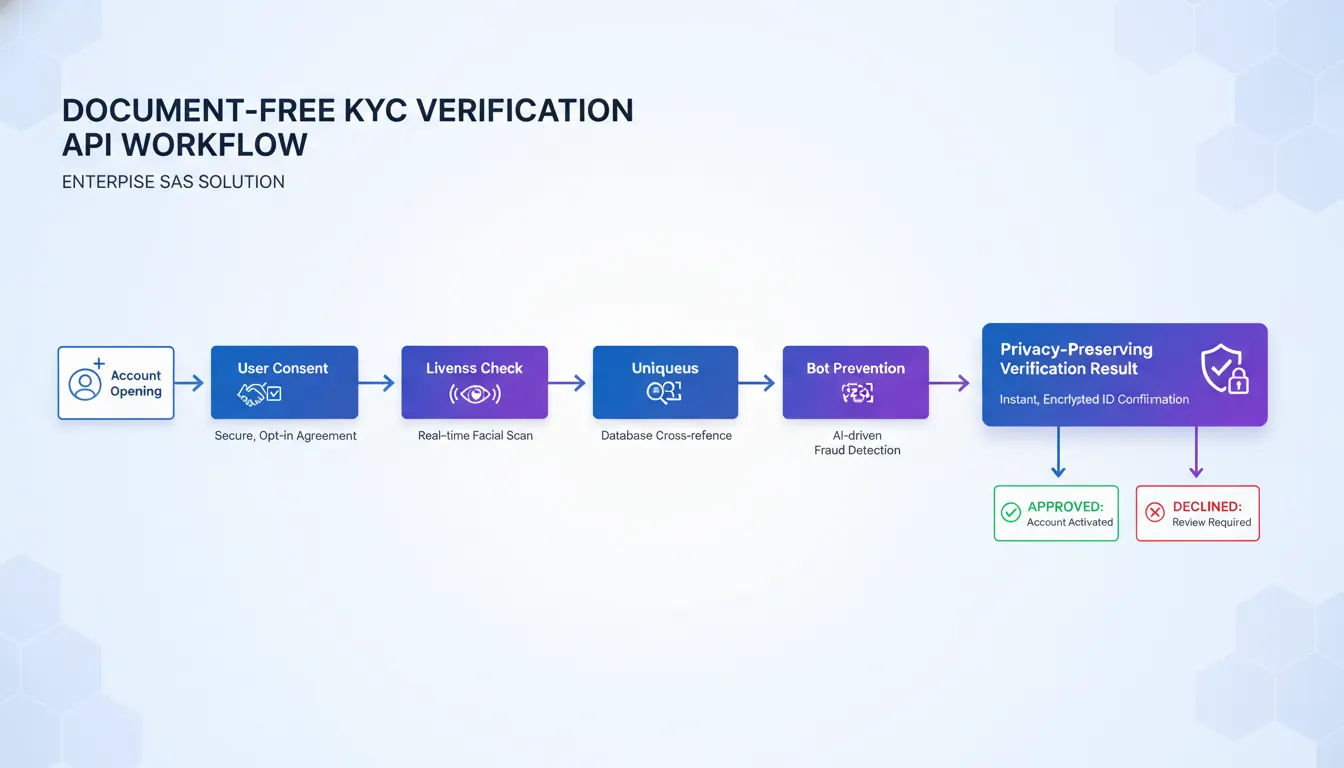
A kyc verification api should fit into the product flow, not sit beside it. The app first explains the check and asks the user for consent. Your backend then creates a short-lived session and passes the client the data needed to start. This keeps the verification step tied to the right account or transaction.
The exact request fields depend on the use case. An account opening flow may need a different policy from a payment or profile update. Teams evaluating a user verification service should map each trigger before writing integration code. That makes later risk actions easier to test and audit.
The verification sequence
A practical workflow uses a small set of steps. The backend owns session setup and policy rules. The client handles the consented user interaction. The API returns metadata that your risk service can apply without treating every result the same way.
- Create the session. Send an internal user or transaction reference, the selected policy, and any safe context your risk layer needs.
- Capture consent. Explain the check in plain language before the user continues. Keep the consent event linked to the session for review.
- Run the liveness check. Confirm that a real person is present during the interaction. Keep retry handling clear when capture quality is too low.
- Check uniqueness when needed. Use the result to spot repeat enrollment or account abuse. This step supports account verification without making every match an automatic rejection.
- Apply the decision. Return a clear outcome such as pass, retry, or review. Include reason codes so the product can choose the right next screen.
- Use the metadata. Send essential result data to the downstream risk layer. Store the decision trail your team needs, not raw capture data by default.
Risk actions after the response
The API response is an input, not the whole policy. A pass can let the user continue. A retry can reopen capture with a clear prompt. A review result can route the case to a queue or add another check. This split helps product teams tune friction by risk level.
For a privacy-first flow, define the retention boundary before launch. VerifEye is designed around no retained images, with only essential metadata kept. NIST digital identity guidance frames proofing as part of a wider risk process. Engineering teams should also log API errors, retry paths, and policy changes so downstream decisions remain explainable.
Document-Based vs Document-Free Verification
A kyc verification api can support more than one kind of check. The right choice depends on the risk, the user journey, and the proof a business needs. Traditional document-based checks ask a user to submit an ID. Document-free checks can confirm human presence without collecting that document.
Different checks for different risks
Document-based verification is useful when a workflow needs identity evidence tied to a government document. The NIST identity proofing guidance explains how evidence supports proofing decisions. This approach can fit bank onboarding or other cases where document review is required.
A provider may compare ID details, check document quality, and match the user to the document holder. The same flow can add steps. Users need a valid document, a usable camera, and time to submit an image. Businesses also need to weigh the privacy exposure that comes with collecting sensitive document data.
| Comparison point. | Document-based verification. | Document-free or facial verification. |
|---|---|---|
| User friction. | Requires ID upload and document handling steps. | Can avoid government ID uploads. |
| Privacy exposure. | Collects sensitive document details. | Can limit data collection for lower-stakes checks. |
| Ideal use cases. | Workflows that require ID evidence. | Human presence, liveness, and account integrity. |
| Speed. | Depends on upload quality and review needs. | Designed for a short verification flow. |
| Limitations. | Adds document access and privacy concerns. | Does not replace required KYC document checks. |
Where document-free checks fit
Document-free verification addresses a narrower need. It can help answer whether a real person is present, whether that person is live, and whether an account needs review. These checks can support an account verification strategy without treating every interaction like a bank application.
Realeyes VerifEye is a privacy-first option for these lower-stakes, high-scale use cases. Its human verification flow does not require a government ID. VerifEye also uses zero image storage. Images are never stored or written to disk, and only essential metadata is retained.
This distinction keeps the check close to the task. A marketplace may need to know whether a person is live before allowing an action. A platform may want an added account-integrity signal during sign-up. Neither event always calls for a government document.
Need to compare document-heavy KYC with a lighter verification layer? Explore Realeyes identity verification solutions before you map your next onboarding flow.
A layered verification design
The two approaches are not interchangeable. A business can route users to the check that matches each action. A document flow may remain necessary for a regulated event. A lighter check can suit sign-up controls, repeated account activity, or fraud screening where document collection would be excessive.
Start by mapping risk levels across the user journey. Then decide which events need formal identity proof and which need a signal of human presence. This layered model avoids a false choice. It uses document-based checks where proof is required and document-free checks where added friction would not fit the risk.
What Should You Look for in a KYC API?
A KYC verification API should fit the risk level, market, and account flow you need to support. Start with the user journey, then assess the technical and business controls behind it. For lower-stakes checks, document uploads may add steps without adding value.
Integration and verification quality
Review the API documentation before comparing feature lists. Look for clear request formats, useful error messages, test access, and a lightweight SDK. Ask how the provider handles failed checks, retries, and changes after launch. Your team should know how much work the first release and later updates will require.
Next, test the verification methods against your real use cases. Liveness checks, uniqueness checks, and bot detection answer different questions. They may also create different levels of user effort. If account abuse is the main concern, review how the API supports account verification across repeat sign-ups.
Privacy, coverage, and compliance support
Map each data field from capture to deletion. Ask whether images are stored, which metadata is kept, and how long records remain available. Confirm where processing occurs and who can view the data. These details matter when comparing a document-based flow with a lower-friction human presence check.
Coverage needs a closer look than a country count. Check the markets, device types, browsers, and network conditions that matter to your users. Ask how the provider tests accuracy across varied groups and how it tracks edge cases. A digital identity verification flow should work for the people you plan to onboard.
Compliance support should be easy to inspect. Request details on consent, data retention, access controls, and audit records. Ask which reports your legal team can review and which events your team can export. The right API should make due diligence easier, not hide key answers behind a sales call.
Reliability, cost, and user experience
Review uptime terms, support hours, rate limits, and incident response before launch. Then model cost based on expected checks, retries, and peak demand. A low per-check price can be misleading if failed attempts create more calls or more manual review.
Finally, test the flow with real users. Count the steps, note where people pause, and check whether the fallback path is clear. Compare API options against the needs of your user verification service, not a generic checklist. The best fit balances fraud controls, privacy, cost, and a smooth path to account opening.
Where Realeyes VerifEye Fits in a KYC API Stack
A document-free verification layer
A KYC verification API stack may combine document checks, data sources, risk rules, and manual review. VerifEye fits as a privacy-first human verification layer within that wider flow. It is not a general KYC provider or a replacement for every regulated check. Instead, Realeyes VerifEye quietly checks whether a real person is behind an account, payment, or profile.
This approach helps teams match the check to the risk. A high-stakes regulated action may still call for document review. Lower-stakes actions can use a faster human check without asking for a government ID. The result is a lighter path for users and a focused signal for the rest of the stack.
The same layer can support several points in the user journey:
- Account opening, when a platform needs a human-presence check before creating a profile.
- Step-up checks, when a user takes an action that needs more trust.
- Uniqueness checks, when one-person-one-account rules help limit repeat sign-ups.
- Age estimation, when a service needs an age-related signal without collecting an ID document.
- Bot resistance, when a platform needs a low-friction alternative to a standard CAPTCHA.
- Ongoing verification, when trust must continue after the first sign-up.
Privacy and trust by design
VerifEye requires no government ID. Images are never stored or written to disk, and the system keeps only essential metadata. That zero-image-storage model cuts the need to retain sensitive visual data. It also supports consent-based checks with GDPR-compliant opt-in data.
These choices matter when teams plan identity verification solutions for large user flows. A document-free layer can reduce collection risk while preserving a clear trust signal. Realeyes also cites SOC 2 certification and PwC audit context as part of its trust framework.
Privacy does not mean a narrow use case. The layer can help detect liveness, uniqueness, age signals, bots, and repeat access. Teams can place each signal where it fits, rather than forcing every user through the same process.
A lightweight API fit
VerifEye is designed for a small integration footprint. Its JavaScript SDK includes a two-line web integration example, so teams can add checks without rebuilding the full onboarding flow. The API layer can sit beside existing rules and review steps. It can also trigger a step-up path when the product needs more assurance.
The documented price is $0.10 per API call. That makes the layer practical for frequent checks, not only a one-time sign-up event. For example, a platform may check account creation, selected actions, and later sessions. The stack can reserve heavier checks for cases that need them.
This modular role is useful when planning a user verification service. Teams can start with the point of greatest friction, such as account opening or repeat sign-ups. They can then add ongoing checks as risk patterns become clearer. VerifEye supplies a human signal while the wider KYC stack keeps its own rules, data sources, and review process.
Should You Build or Buy a KYC Verification API?
The decision starts with the use case
Building a KYC verification API can make sense when identity checks are a core product function. It may also suit teams with unusual workflows or strict control needs. Buying an external API is often the faster path when the goal is safe onboarding without a long build cycle.
Start by naming the exact problem. Document checks, liveness checks, age estimates, and one-person-one-account controls solve different problems. A team handling lower-stakes, high-volume checks may not need a full document workflow. Realeyes VerifEye, for example, is designed to confirm human presence without government ID documents. Its privacy-first verification approach uses zero image storage.
The right question is not whether an in-house system is possible. It is whether building it creates a real edge for the business. Teams comparing options should map the flow against their wider digital identity verification plan before choosing a path.
Costs that appear after launch
An in-house build offers direct control over data handling, interfaces, and release timing. Yet the first release is only the start. Engineering teams must keep models, review rules, logs, alerts, and fallback paths current. Risk teams also need evidence that the process works as intended.
Audit needs deserve early attention. Decide what metadata must be kept, who can view it, and how long it stays available. Then test whether the system can explain a decision without keeping data the business does not need. Privacy choices affect product design, not just legal review.
Global performance adds more work. A model should be tested across the people, devices, networks, and lighting conditions found in the target market. The user flow also needs clear recovery paths when a check fails. A fast check that confuses real users can still raise support costs and abandonment.
- Choose an in-house build when verification is a core advantage and the team can fund ongoing model work.
- Choose an external API when speed, tested workflows, and lighter maintenance matter more than full control.
- Use a mixed approach when the business needs its own decision rules around a focused verification service.
A practical review before committing
Run a short proof of concept with real product conditions. Measure completion time, error handling, support effort, and the quality of audit records. Review privacy controls with engineering and legal teams. Include poor cameras, slow connections, and repeat attempts in the test set.
For an external provider, ask how it handles model updates, regional performance, uptime issues, and changes to the user flow. Confirm which data is stored and which data is not. Compare integration work against the cost of maintaining an internal service over time.
Finally, test whether a general KYC workflow is needed at all. Some products need document checks and deeper review. Others need a low-friction human check at scale. A focused API may reduce complexity while supporting a smoother third-party ID verification flow.
Frequently Asked Questions
How does a KYC API streamline identity verification?
A KYC API connects verification checks to the account-opening flow, so teams can automate routine decisions and reduce manual review. The exact workflow depends on the use case. For lower-friction account opening, VerifEye can check liveness, uniqueness, age, and human presence without asking users to upload government ID documents.
What is the typical cost of a KYC API check?
KYC API pricing varies by provider, verification method, and volume. Document and biometric checks may be priced differently from low-friction human-presence checks. For a specific reference point, VerifEye is priced at $0.10 per API call. Teams should compare per-check pricing with review costs, completion rates, and the level of assurance required.
Are there free KYC API solutions available?
Some providers offer free tiers, sandbox access, or limited trial credits for development and testing. A free option may not include the volume, support, data coverage, or verification methods needed for production. Before choosing one, confirm rate limits, security controls, privacy terms, retention practices, and whether the service fits the account-opening risk level.
What data sources does a KYC API use?
A KYC API may use government databases, identity records, watchlists, document checks, or third-party verification services. The right mix depends on regulatory obligations and the account-opening risk level. Some lower-friction flows use facial signals instead. For example, VerifEye checks liveness, uniqueness, age, and human presence without collecting government ID documents or storing user images.
What are the primary benefits of using a KYC API over manual processes?
A KYC API can reduce repetitive review work, apply checks consistently, and return results inside an existing onboarding flow. That can make account opening faster while preserving a clear verification step. The strongest setup matches assurance to risk: use low-friction checks for lower-stakes access, then add document review or human review when the use case requires it.
Ready to simplify account opening with VerifEye?
Every extra step during account opening can make the path harder for legitimate users. It can also leave your team managing avoidable friction. Waiting to review your verification flow delays the chance to remove that burden. Start now to define your requirements, identify integration priorities, and see where VerifEye may fit your account-opening process.
Ready to plan your next step? Book a VerifEye demo to discuss your account-opening flow, your priorities, and the points that create friction today. Bring your current process and the questions your team needs answered. Start the conversation now so you can map a practical path forward.