


A security guard at a high-security building doesn’t just glance at your ID. They look at the photo, then they look at you, to confirm you’re real. Liveness detection does the same job online. It confirms not just who you are, but that you’re actually present, right now.
Key Takeaways
- Confirm real human presence: liveness detection verifies a user is a living person in real time, defending against spoofing attacks that use photos, videos and deepfakes.
- Strengthen security without adding friction: passive liveness checks replace clunky passwords with fast, secure authentication.
- Choose what fits your platform: the right solution integrates with your existing systems and scales as you grow.
What is Liveness Detection?
Liveness detection is a technology that tells the difference between a real, live human and a fake representation: a photo, video, mask or deepfake. It uses AI and computer vision to analyse subtle cues such as how light reflects off skin, involuntary facial movements and blood flow beneath the surface. These signs of life are difficult to fake.
Think of it as the second half of biometric authentication. Facial recognition asks: is this the right person? Liveness detection asks: is this person actually here, right now?
“Identity and presence are separate questions. Confirming who someone is doesn’t confirm they’re actually there.”
Active vs Passive Liveness: Finding the Right Balance
Active liveness asks users to perform a specific action, such as smiling, blinking or turning their head. Because these challenges can’t be replicated by a static photo or a simple video, they work well for high-stakes scenarios like authorising large payments or accessing sensitive data.
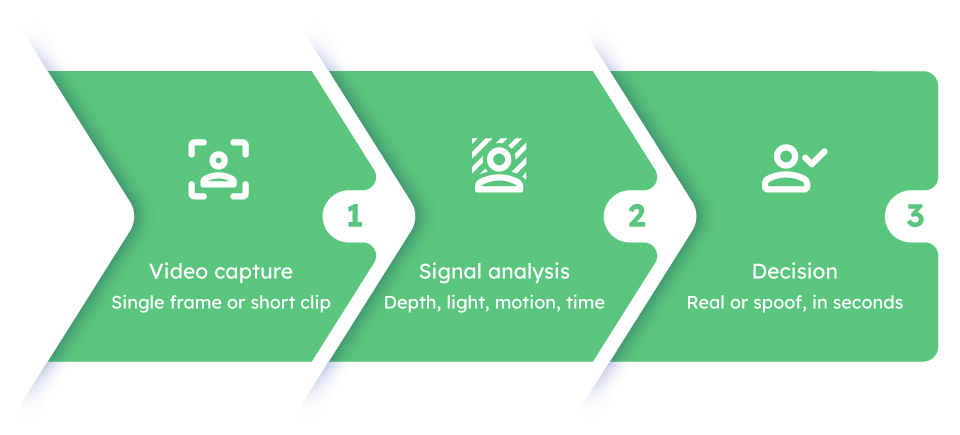
Passive liveness works silently in the background, analysing a single frame or short video without requiring any user action. It’s faster and harder for fraudsters to anticipate, so for lower-risk interactions such as logging into social media or gaming platforms, it’s the better fit.
Hybrid approaches start with passive analysis and only ask for an action if needed, giving you speed for most users and extra assurance when risk is higher.
The key is flexibility. Your platform should adjust its security level to the transaction’s risk rather than apply the same check to everyone.
| Approach | How it works | Best for | Trade-off |
|---|---|---|---|
| Active | Asks the user to perform an action, such as blinking or turning their head | High-stakes moments: large payments, sensitive data access | Adds a small amount of friction |
| Passive | Analyses a single frame or short clip silently, with no user action | Lower-risk logins: social media, gaming | Slightly less assurance on its own |
| Hybrid | Starts passive, then asks for an action only if risk is elevated | Platforms that need to flex security to the transaction | More complex to configure than a single mode |

How Liveness Detection Actually Works
The AI Behind It
Modern liveness detection uses deep neural networks trained on millions of images and videos, including real people and spoof attempts. The system analyses:
- Depth and texture: a real face is three-dimensional with natural skin texture, while a 2D photo is flat.
- Light reflection: skin reflects light differently to a screen or printed photo.
- Micro-movements: involuntary blinks, eye movements and the subtle colour changes caused by blood flow, which are difficult to replicate.
- Temporal data: how a face changes over a few seconds. A deepfake might fool a single frame but usually fails over time.
What it Stops
- Photos and video playback: detected by analysing depth and light reflection.
- Masks and 3D spoofs: silicone and plastic reflect light differently to skin, and the system picks up on that.
- Deepfakes: advanced liveness systems use their own AI to detect microscopic inconsistencies and digital artefacts invisible to the human eye.
Why Liveness Detection Matters Now
The threat landscape has changed. Deepfakes and AI-generated media are increasingly realistic, and the tools to create them are cheap and accessible: fraudsters can build a convincing fake identity for as little as $15. This is happening now, not in some future scenario.
Without liveness detection, a fraudster with a stolen photo or a convincing deepfake can bypass standard facial recognition. With it, they can’t.
The Real-World Impact
- Account takeover fraud: even with a stolen password and profile picture, liveness stops the attempt.
- Synthetic identity fraud: criminals can’t invent an identity that passes a liveness check.
- SIM-swapping and credential stuffing: when biometric verification is tied to account access, these attacks fail.
How it Compares to Older Methods
Passwords are easily stolen, reused and forgotten. Static biometrics, such as a fingerprint scan or a single face photo, can be spoofed with a high-res photo or video. Liveness detection adds the proof of life they lack, replacing “what you know” with “who you are.” For users, that’s faster and more secure. For platforms, it’s a meaningful upgrade to your security posture.
“A password proves what someone knows. Liveness proves who’s in front of the camera right now.”
Industries Where it Matters Most
Financial services: banks and fintechs use liveness to prevent fraudulent account openings and secure mobile authentication, which is essential for KYC and AML compliance.
Healthcare: liveness detection secures access to sensitive medical records and telehealth platforms, so only the right person views personal health information.
Telecommunications: it protects against account takeovers and SIM-swapping by verifying that the person requesting an account change is the legitimate owner.
E-commerce: it stops presentation attacks, meaning spoofing with photos or videos, before a fraudulent transaction happens.
Travel and border control: automated e-gates at airports use liveness to confirm the person holding a passport is its legitimate, living owner.
The Main Implementation Challenge
The biggest hurdle isn’t the technology. It’s real-world conditions: users won’t always be in good lighting, and their phone camera might be older. Poor conditions can sometimes cause legitimate users to fail verification, which is frustrating for everyone involved.
This is where the quality of your liveness solution matters. Strong systems use AI-powered image enhancement and real-time guidance to maintain accuracy across devices and lighting conditions.
The second challenge is balancing security with user experience. A system that’s too cumbersome will frustrate legitimate users, so the best solutions verify someone in seconds without special actions or hardware.
Choosing a Liveness Detection Solution
Assess Your Specific Risks
Before you shop around, understand your threats. Are you preventing account takeovers? Securing high-value transactions? Stopping bots? The level of security you need varies by industry and use case.
“A vendor’s claim isn’t proof of performance. Independent certification is.”
Require Independent Certification
Don’t just trust vendor claims. Look for results from independent labs like iBeta, which run liveness systems through spoofing attacks using photos, videos, masks and deepfakes, then publish objective proof of performance against the ISO/IEC 30107-3 standard. Certification is the gold standard.
Verify Privacy-First Design
Handling biometric data is a serious responsibility. A red flag is any system that stores raw facial images: if that database is breached, the data is compromised for good, unlike a password, which you can reset.
The best solutions convert facial data into encrypted mathematical representations that can’t be reverse-engineered. Ask vendors directly how long they retain data, where it’s stored and what their data destruction policy looks like.
How Realeyes Approaches It
VerifEye is built on data minimisation. It analyses your video stream in real time to confirm liveness, generates a simple yes or no signal, then immediately discards the raw video. You get the security proof you need without storing sensitive biometric data, which helps you meet GDPR and other privacy-first requirements. VerifEye’s Reverify application applies this same approach whenever you need to confirm it’s still the same person over time, and Protect steps up to it automatically when risk spikes.
See exactly how the check runs, step by step, on the Platform page.
What’s Next for Liveness Detection
The technology isn’t standing still. As deepfakes and AI-generated media improve, liveness detection systems are improving faster.
AI evolution: deep neural networks are getting better at detecting deepfakes and subtle spoofing attempts, and they keep adapting as new fraud tactics emerge.
Multi-modal verification: voice liveness can verify live speech against a recording. Combining facial liveness with voice analysis or document verification creates a layered defence that’s harder to defeat.
Cross-platform reach: liveness detection is expanding beyond phones and desktops, working across web, mobile and emerging devices without special hardware.
Getting the Most From Your System
Layer it with multi-factor authentication. Liveness detection confirms presence, but pairing it with something the user knows, such as a password or PIN, or something they have, such as an authenticator app, makes it far harder for bad actors to succeed.
Monitor and update continuously. Fraud evolves constantly, so your liveness system should use machine learning to adapt to new threats and receive regular security updates.
Prioritise privacy compliance. Build genuine user trust by being transparent about how you handle biometric data and by meeting standards like GDPR and CCPA.
FAQs
Is liveness detection the same as facial recognition?
No. Facial recognition confirms identity, matching a face to a stored record. Liveness detection confirms presence, checking that the face in front of the camera belongs to a real, living person rather than a photo, video or mask. Most identity checks use both together.
Can liveness detection be spoofed?
Well-built systems are very hard to spoof, but no security measure is unbeatable forever. This is why independent certification matters: labs like iBeta test systems against real presentation attacks and publish the results, rather than relying on a vendor’s word.
Does liveness detection store my face?
It depends on the vendor. Privacy-first systems, including VerifEye, analyse the video stream in real time, produce a yes or no signal, then discard the raw footage rather than storing it.
Does liveness detection need special hardware?
No. Modern liveness detection runs on a standard phone or webcam camera. It doesn’t need infrared sensors, depth cameras or any other special hardware to work.
The Bottom Line
Liveness detection is no longer optional for platforms that take security seriously. It answers the question every platform needs answered: is this a real person, right here, right now? If you’re comparing options, see how VerifEye’s Onboard and Platform pages approach liveness as part of a broader identity check.