


Seller payout account takeover starts when someone changes where a real seller’s money goes. The account still looks normal, and so do the listings and orders. The loss only begins when a new bank account, wallet or payout partner is saved and the next disbursement uses it.
That is why a marketplace should treat the payout edit as its own decision. A valid login does not approve a new destination. Instead, hold the money that would use it, confirm the enrolled seller and release the payout only once that check is clear.
What Seller Payout Account Takeover Looks Like
The sequence is short. Someone gets into the seller account, changes where the money goes and waits for the next payout run. Meanwhile, buyers may still receive goods from older orders. Support often hears nothing until the real seller misses a deposit.
This is not a fake seller who never meant to ship, and it is not a buyer with a stolen card. The account has already earned trust. The attacker simply spends that trust on a destination the platform has never confirmed.
How the attacker got in matters less than you might think. Stolen credentials, a hijacked session, a shared login or a reset password can all lead to the same edit. So the payout screen does not need to know the route. It only needs to notice that the destination changed.
Covered marketplaces already collect payout details. The FTC says the INFORM Consumers Act requires bank account information from high-volume third-party sellers. Similarly, the EU Digital Services Act asks in-scope platforms for a trader’s payment account details before that trader sells to EU consumers.
However, those duties describe the seller at the start. They do not prove who is at the payout screen months later. A stored bank record can be correct and still be replaced.
A Normal Bank Change Versus a Takeover
Sellers change banks for ordinary reasons. A new business account, a closed branch or a new payout partner can all be genuine. So expect the edit, but do not let it approve itself.
The order of events is the clue. A known device making a single change looks like routine admin. By contrast, a session that rewrites the email, phone number and payout partner in one sitting looks like a handoff. Hold both, but review the second faster.
Next, define which fields trigger a hold. These should include:
- A bank account number
- A wallet address
- A new payout partner
- A new beneficiary name
- A split that redirects part of each payout
Cosmetic changes, such as a display label, can be logged without a hold.
Why the Payout Change is the Control Point
A suspicious login is a clue, while a completed payout is a loss. The editable destination sits between them. If the new destination takes the next run, recovery becomes a chase across banks and support tickets.
So hold only the payout that would use the new destination. There is no need to freeze the catalog unless other signals say the account is unsafe. Orders that still pay the last confirmed destination can proceed as normal. Only new money waits.
Timing sharpens the signal. A new device followed quickly by a destination edit deserves a harder stop and a reviewer alert. In contrast, a change from a long-trusted session is lower risk. Even so, neither should pay out before the check.
| Signal | What it suggests | What to hold |
|---|---|---|
| New device, then a new payout destination | A classic takeover sequence | The next payout and the destination edit |
| Destination edit from a trusted session | Could be a genuine bank change | Only payouts that use the new destination |
| New email plus a new destination | Account recovery is being taken too | Payouts, the destination and the contact change |
| First payout on a new seller | Money has not tested onboarding yet | That payout until fulfillment and the seller check agree |
The table is a hold policy, not a fraud verdict. Real sellers do switch banks. The switch simply waits until the enrolled person confirms it.
What Stays on Hold
Reserve the funds that would use the new destination, so finance sees a reserved balance rather than a missing one. Where the last confirmed destination is still valid, keep paying it.
Then tell the seller the payout is paused because the destination changed. Use a contact channel that existed before this session. A banner inside a taken-over account is easy to dismiss, and the real seller may never see it.
Finally, make sure expiry never pays anyone. If the check is never completed, drop the pending destination and return the funds to the seller’s balance. Releasing after 24 quiet hours is exactly how a patient attacker wins.
What the Step-Up Must Prove to Stop Seller Payout Account Takeover
The question is narrow: is the enrolled seller present for this destination change? A password reset does not answer it. Nor does an SMS code sent to a number saved in the same session.
Step-up human verification belongs on the payout edit itself. VerifEye supports both active and passive liveness, then matches the face to the seller enrolled at onboarding. Active prompts still help against some replay attacks, but they are weak against real-time deepfakes. That is why passive liveness and the enrolled match carry the decision, not the prompt alone.
It is worth being precise about what a match shows. It confirms the face belongs to the enrolled seller. It does not, by itself, prove legal ownership of the marketplace account, so the hold should rest on that narrower fact.
Run the check before the new destination is trusted. A pass releases the held payout. A fail keeps the old destination. An unclear result keeps the hold and opens a review rather than guessing.
Beyond the payout screen, Reverify can re-confirm the seller at other high-risk moments, so sensitive actions never run on a stale login.
Privacy Without a Second Biometric Store
Sellers already share bank details because the law asks for them. The step-up should not add a second store of biometric files on top.
With VerifEye, processing can stay on device. At onboarding, the seller’s selfie is converted into a Face Credential and the image is deleted. The credential cannot be turned back into a picture, yet it is all a later check needs to compare against.
Human presence is the extra fact a password cannot supply. Broader account takeover prevention still covers passwords, bots and session risk, and this checkpoint does not replace that program.
How to Release or Keep a Seller Payout Hold
Write the outcomes down before the first seller hits them. Otherwise, a team that invents the rules during a payout run will either pay the attacker or trap a real seller.
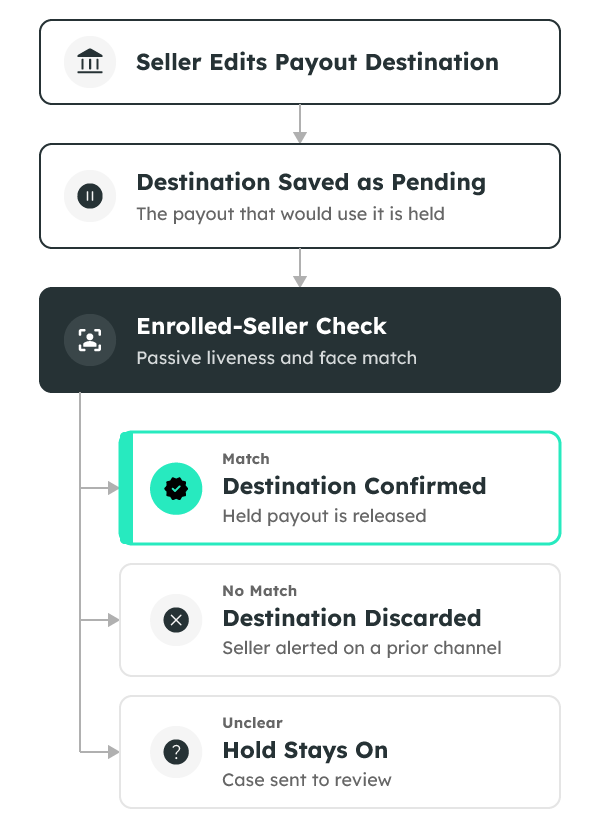
- Save the new destination as pending. Keep paying the last confirmed destination only if policy already allows it.
- Run the enrolled-seller check on the change itself, not on a generic login.
- If the face matches, mark the destination confirmed and release only the held payout tied to it.
- If the face does not match, discard the pending destination and alert the seller on a channel that predates the session.
- If the result is unclear, leave the hold on and send the case to review with the session facts attached.
- If the seller cannot finish the check, use account recovery that matches the enrolled face again. Never email a reset link to an address changed in this session.
Keep reviews small. The reviewer needs the old destination, the new one, the session context and the check result. A full identity case is for suspected collusion or a brand-new seller, not every bank edit.
Give the Reviewer a Timeline, Not a Score
A risk score without a sequence is hard to defend. Instead, show the login, the device, the contact edits and the payout edit in order. Mark which destination was confirmed before today and which one is still pending.
Reviewers should also see the notice that went to the older channel and whether the seller replied. They should not see a raw face image, though. The check result, its time and its pass or fail state are enough for the payout decision.
If the seller reports the change as unauthorized, revoke active sessions before anyone discusses the funds. Then review recovery settings, connected devices and recent payout attempts. Preserve that timeline for the seller and for any later investigation.
Keep Support and Payout Release Separate
Support can help a seller get back into their account. However, support should not approve a new destination in the same conversation. In short, one role should never both propose the edit and release the hold.
What a Payout Hold Does Not Replace
A payout hold will not catch an attacker who never touches the destination. It will not prove that goods shipped, and it will not replace seller onboarding.
In fact, onboarding is what makes the hold work. It is where the seller’s Face Credential is created and where the first payout account is tied to that seller. Without that anchor, a later match has nothing reliable to compare against. Our guide to marketplace identity verification covers that first step for two-sided platforms.
Other threats need other controls. Fake seller detection looks at listings and reviews, while coordinated account abuse looks at linked clusters. When many sellers share a destination or a device, a face-based uniqueness check can also show whether one person sits behind several accounts. Upstream, credential stuffing prevention still stops reused passwords before a session exists.
A Rollout Plan for Seller Payout Account Takeover Controls
The simplest way to stop seller payout account takeover is to start with one flow: an existing seller edits a payout destination. Leave buyer checkout and ordinary listing edits alone for now. The first release should be simple enough that every team trusts it.
Next, give risk, payments and support the same words for pending, confirmed and rejected. If support says the money was sent while payments still has it on hold, the control quickly turns into a complaint.
Then pilot on a slice of sellers and read the results each week. Watch for false challenges on trusted devices. Also watch for attackers who save a destination and wait out a short timer. A hold that expires into payment is not a hold.
Staff tools need the same rule, because a stolen employee session can edit a bank record too. So require the enrolled-seller check whenever an internal user proposes the change. Log the staff identity beside the result and notify the seller on a channel that employee cannot edit.
Once the loop is stable, widen it. A new payout partner, a new beneficiary name or a split of each payout can all redirect money. Treat each one as a destination change and apply the same hold.
What Good Looks Like After 30 Days
Judge the pilot on four measures:
- Payouts stopped before they used a new destination
- Enrolled sellers who confirmed a genuine bank change without raising a ticket
- Holds that expired without paying anyone
- Support contacts that quoted the same status payments used
Do not declare success from a lower fraud rate alone, because a quieter number can hide sellers who gave up. Read abandonment alongside stopped payouts. If trusted sellers abandon the change, shorten the check rather than removing the hold.
For how fresh a login should be, NIST’s authentication guidance is a useful reference. Still, it does not replace the enrolled-seller check, because a strong authenticator can be present in a session the seller no longer controls.
Planning for Marketplace Scale
VerifEye runs over 1 billion verifications each day. To see how verification holds up at that volume, read the 1 Billion Verifications paper.
Frequently Asked Questions
Does a face match prove the seller owns the account?
No. A match shows the face belongs to the enrolled seller. It does not, by itself, prove legal ownership of the marketplace account, so tie the payout decision to that narrower fact.
Should every payout require a new check?
No. Repeat payouts to a confirmed destination can stay on existing risk rules. A new destination is the event that should stop the next release.
What happens if the seller fails the check?
The old destination stays in place and the pending one is discarded. Then contact the seller using details confirmed before this session.
Is a prompt challenge enough against deepfakes?
No. Active prompts are weak against real-time deepfakes, so pair any prompt with passive liveness and a match to the enrolled seller.
Where should a team start with seller payout account takeover?
Hold payouts that would use a newly saved destination. Then confirm the enrolled seller on that change and release the hold only once the check is clear.