

Enterprises don’t fail identity verification projects by picking the wrong vendor. They fail by never agreeing on what “verified” needs to mean for their use case. The global identity verification software market is on track to grow from $15.84 billion in 2026 to $50.58 billion by 2034, a 15.6% annual growth rate (Fortune Business Insights). That growth means more vendors, more overlapping claims, and more pressure to shortlist on features instead of on the assurance question you’re actually trying to answer.
This guide separates that question from the vendor pitch. It covers what identity verification software can actually prove, which signals matter for which risk, how privacy and deployment model should shape your shortlist, and how to run a proof of concept that survives contact with production traffic.
“Ownership and presence are separate assurance goals. Buying software that proves one doesn’t mean you’ve proven the other.”
What Identity Verification Software Actually Verifies
“Identity verification” hides at least three different questions, and enterprise buyers should separate them before comparing products. NIST’s identity-proofing framework splits the process into resolution, validation, and verification (NIST guidance). Each layer answers something different, and each requires different evidence.
Gartner frames the category more broadly: software should confirm a real-world identity exists, that the claimant owns it, and that the person is genuinely present during the interaction (Gartner overview). Ownership and presence are separate goals. Conflating them is how teams end up buying document-heavy tools for problems that only needed a presence check, or the reverse.
| Layer | Question it answers | Typical evidence |
|---|---|---|
| Resolution | Is this a unique, real person in our population? | Liveness + uniqueness signal |
| Validation | Is the submitted evidence authentic? | Document or attribute check |
| Verification | Does the presenter own this identity? | Document-to-person match |
Before you compare vendors, answer one question: which of these three layers does your workflow actually need? A fraud-prevention or duplicate-account use case often stops at resolution. A regulated onboarding flow usually needs all three. Buying more assurance than the use case requires just adds friction and data you now have to govern.
Which Signal Fits Your Risk
Liveness, uniqueness, and document evidence answer different questions, and treating them as interchangeable is a fast way to buy the wrong tool. Liveness confirms a real human is present, not a photo, replay, or bot. Uniqueness confirms that person hasn’t already registered under another identity. Document evidence ties a person to a government-issued credential.
The stakes for getting this wrong are rising. Entrust’s 2026 Identity Fraud Report found deepfakes now account for one in five biometric fraud attempts, with deepfaked selfie attempts up 58% in a single year (Entrust). A liveness check built for yesterday’s presentation attacks won’t hold up against that shift.
| Signal | Protects against | Does not establish alone |
|---|---|---|
| Liveness | Bots, replay, deepfakes | Legal identity, account ownership |
| Uniqueness | Duplicate accounts, sybil abuse | That the person is who they claim |
| Document evidence | Identity misrepresentation | Human presence at time of use |
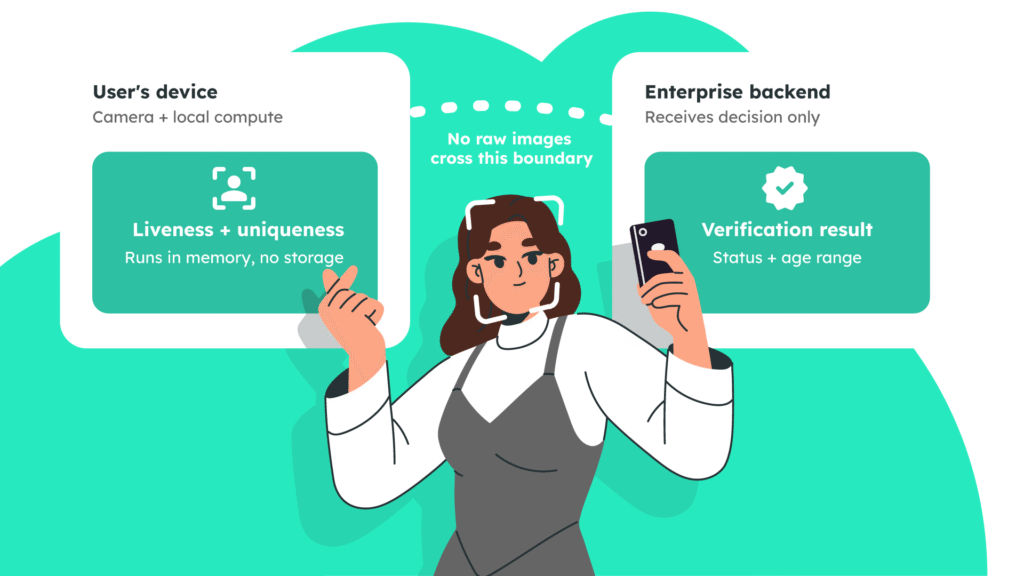
VerifEye is built for the liveness-and-uniqueness layer specifically. It runs on-device or in memory, confirms a real, unique human without collecting a government ID, and doesn’t retain raw biometric images — only decision-level metadata like verification status or an age range. Document-based proofing still has a place for regulated onboarding, but plenty of workflows never needed it in the first place. Related reading: liveness detection in authentication.
“More data is not automatically more trust. It’s just more data your team has to govern.”
Privacy and Compliance Belong in the Shortlist, Not After It
Treat privacy as a product requirement, not a procurement afterthought. The questions that matter: what are users consenting to, where does processing happen, what does the system retain, and can you produce evidence for an auditor on demand?
Ask every vendor to map their data lifecycle against four points:
- Processing location. What runs on-device, what reaches a server, and what transfer or residency rules apply in each jurisdiction you operate in.
- Retention. Specific retention periods for images, hashes, logs, and decisions. “We don’t store it” should be precise enough for your security team to test.
- Protection. Encryption in transit and at rest, key management, and deletion workflows.
- Audit evidence. Data-flow diagrams, access logs, and compliance certifications you can hand to a regulator.
VerifEye uses explicit opt-in consent, processes on-device or in memory, and doesn’t persist images. Realeyes reports TLS 1.3 for API traffic, AES-256 for temporary data, and a training base of more than six million consented participants across 93 countries — useful context, not a substitute for testing your own user population. A privacy-first architecture still needs your own documented assessment before launch. See privacy-preserving age verification for how this plays out in a regulated use case.
Choosing an Integration and Deployment Model
The right delivery model depends on where verification needs to sit, not on which architecture looks most modern. A consumer app with a native mobile flow usually needs an SDK. A regulated environment needs infrastructure boundaries it can document for security review. A multi-product platform needs an API it can reuse instead of rebuilding logic per app.
| Model | Best fit | Key trade-off |
|---|---|---|
| API and SDK | Native products, tailored journeys | More control, more integration work |
| Turnkey app | Fast adoption, prescribed flow | Less control over UX and orchestration |
| Cloud SaaS | Centralized, multi-product delivery | Depends on external service boundary |
| On-premise | Strict infrastructure or governance rules | More operational responsibility internally |
| Hybrid | Mixed data or regional requirements | More moving parts to coordinate |
API and SDK coverage deserves specific scrutiny. VerifEye supports JavaScript, Android, iOS, Python, .NET, Unity, and C++, which covers most web, native, and backend stacks. The real test isn’t whether your language appears on a list — it’s whether the interface fits your full lifecycle: consent, capture, retries, observability, and rollout. See Face API and mobile SDKs for integration specifics.
How Fast Should Verification Feel?
Latency isn’t one number. It’s everything a user experiences between opening the camera and getting a clear next step: startup, capture guidance, processing, and any retry path. A technically fast model still feels slow if the interface leaves someone waiting without explanation.
Split the work that happens on-device from anything that needs a network round trip first. Realeyes describes VerifEye processing as completing in milliseconds on-device, with full verification under five seconds. Treat that as a starting benchmark, not a guarantee — test it on your own traffic. (Source)
Measure at p95, not just the average. An average can hide the users who wait longest. Track camera readiness, capture completion, and API response separately, across real devices and weak connections, not just a flagship phone on office Wi-Fi. Then pair every latency number with completion and false-decline rates — a faster flow that increases retries hasn’t actually improved anything. See on-device verification latency for a deeper benchmark walkthrough.
“A polished demo tells you what a vendor can do in ideal conditions. A proof of concept tells you what happens on your traffic.”
The Enterprise Evaluation Checklist
A credible evaluation tests the whole operating model, not a feature list. Use this sequence to structure vendor conversations and internal sign-off:
| Step | Focus | Key question |
|---|---|---|
| 1. Define the use case | Assurance level required | Presence, uniqueness, or ownership? |
| 2. Map signals to threat | Liveness, uniqueness, documents | Which signal stops the actual abuse pattern? |
| 3. Test privacy first | Consent, retention, access controls | Can you produce audit evidence on demand? |
| 4. Review API/SDK fit | Docs, environments, versioning | Does it fit your full lifecycle, not just your stack? |
| 5. Measure real performance | p50/p95 latency, completion rate | Does speed hold up on real devices and networks? |
| 6. Assign ownership | Monitoring, incident response, appeals | Who owns a false decline at 2am? |
| 7. Check fairness | Representative test cohorts | Does it fail more for any group? |
| 8. Run a bounded POC | Pass/fail criteria set in advance | Does it hold up on your traffic, not a demo? |
| 9. Review commercial terms | Contract, exit rights, data portability | What happens if you need to leave? |
Don’t accept a polished demo as evidence of production performance. Run the POC against representative traffic, real devices, and your actual failure paths, and define completion rate, false accepts/rejects, latency, and integration effort as pass/fail criteria before you start — not after you’ve already picked a favorite.
Frequently Asked Questions
What does identity verification software actually verify? Depending on the workflow, it can confirm a real person is present, that a user is unique, or that a person matches a government-issued document. These are separate assurance levels — define which one your use case needs before comparing vendors.
Does it always require a government ID? No. Document-free verification works well for confirming human presence, blocking duplicate accounts, or adding a privacy-preserving trust signal. Regulated onboarding may still require document-based proofing depending on jurisdiction.
How do liveness and uniqueness differ? Liveness confirms a real person is present rather than a photo, replay, or bot. Uniqueness confirms that person hasn’t already registered under a different identity. Some workflows need one signal, others need both.
What should a POC measure? More than a demo pass. Measure real latency, completion and fallback rates, fraud detection accuracy, integration effort, device coverage, and privacy controls against your own traffic and edge cases.
How should we test latency? Measure the full journey — camera readiness, capture, processing, and decision — and report both median and p95 results across real devices, browsers, and networks. Pair speed with completion and false-decline rates so a faster flow doesn’t quietly get worse.